 how-to
How to Relieve Desk Pain With Physical Therapy Exercises
Last Updated: October 28, 2026
Quick Summary
Physical therapy for desk pain focuses on setting up your workstation correctly, stretching during breaks, and strengthening the muscles that support good posture. Following a progressive four-week plan lets you build these habits gradually. If numbness, tingling, or weakness appears, or pain does not improve, see a professional.
- Set your monitor about an arm's length away, top of screen at or below eye level.
- Keep feet flat, knees at or below hip height, and leave a two to three finger gap behind your knees.
- Do the short three-minute break routine two to three times per day.
- Add wall angels, glute bridges and dead bugs to build posture-supporting strength.
- Stop and consult a clinician if you notice sharp pain, numbness, tingling or weakness.
Table of Contents
- Why Sitting All Day Causes Neck, Back and Shoulder Pain
- Step 1: Set Up Your Workstation to Reduce Strain
- Step 2: Build a Desk Stretch Routine for Neck and Back Pain
- Step 3: Retrain Your Posture With Strengthening Exercises
- Step 4: Follow a Progressive Four-Week Desk Exercise Plan
- Common Mistakes That Stall Progress and How to Avoid Them
- Booking Your Physical Therapy Assessment at ProFormance Sports
- Frequently Asked Questions
Why Sitting All Day Causes Neck, Back and Shoulder Pain
Desk pain is one of the most common complaints among people who spend most of their workday seated. Physical therapy for desk pain may address movement and strength. (Source: a 2023 report by the Bureau of Labor Statistics)
Common symptoms in the neck, back, shoulders and hips
Desk-related discomfort shows up in predictable places. Watch for these signs:
- Neck: Stiffness, a dull ache at the base of the skull, or pain when turning to check a mirror
- Upper back: A tight feeling between the shoulder blades by mid-afternoon
- Shoulders: Pulling or pinching when reaching forward, especially toward a keyboard
- Lower back: Soreness that eases when you stand up and returns after sitting again
- Hips: A tight or pinching feeling at the front of the hip after long sitting
When desk discomfort needs medical attention
Some symptoms may warrant professional evaluation. See a doctor if you notice:
- Numbness, tingling, or weakness in an arm or leg
- Pain that wakes you up at night or does not change with rest
- Pain after a fall, injury, or accident
- Fever, unexplained weight loss, or pain with bladder or bowel changes
This guide covers general information only, so a qualified professional should assess concerns that do not improve.
Step 1: Set Up Your Workstation to Reduce Strain
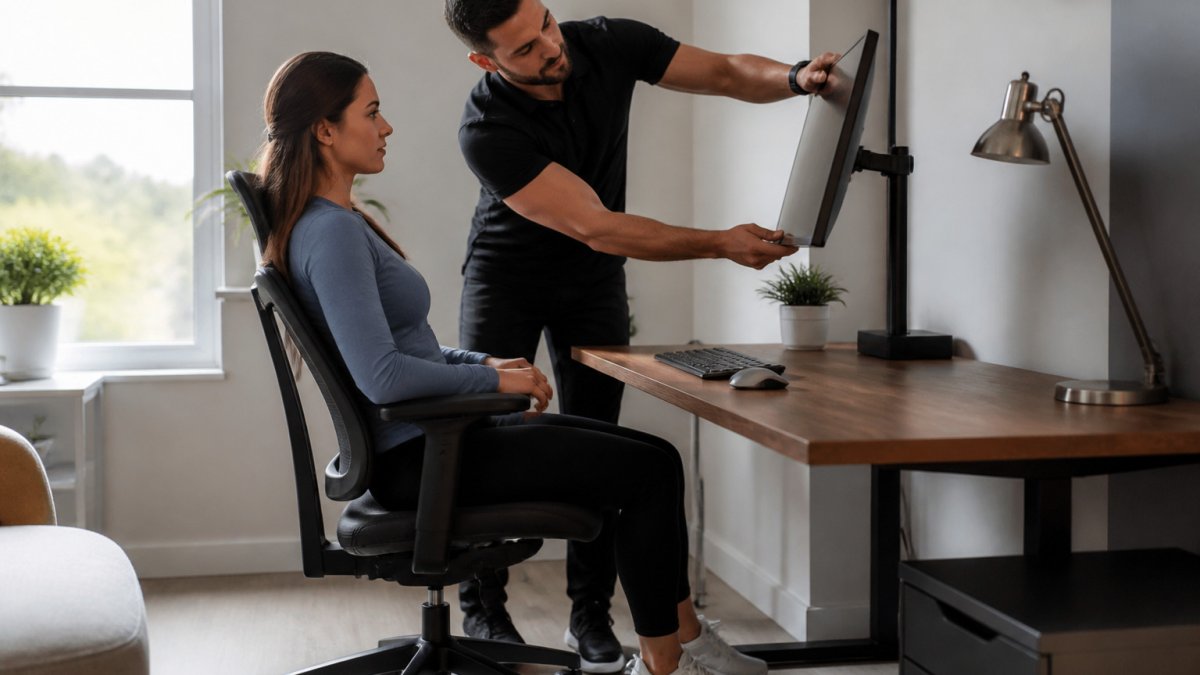
Your desk setup either supports good posture or works against it. A few small adjustments can cut strain without buying new furniture. The key is to set up by measurement, not by feel, and to recheck every few days because chairs and monitors get bumped.
Specific measurements for monitor, chair and keyboard
Use these starting points and adjust as needed:
- Monitor: Top of the screen at or just below eye level, about an arm's length away (roughly 20 to 24 inches from your eyes). If you wear bifocals, lower the monitor slightly so you do not tilt your head back.
- Chair height: Feet flat on the floor, knees at or slightly below hip height. If your feet do not reach the floor, use a footrest or a stack of books. If your knees are higher than your hips, raise the seat.
- Chair depth: Leave a two- to three-finger gap behind your knees so the seat edge does not press into your legs.
- Lower back support: The lumbar curve should be supported at belt level. A rolled towel or small cushion works if your chair lacks adjustable lumbar support.
- Keyboard: Elbows bent about 90 degrees, forearms roughly level with the desk. Your wrists should be straight, not bent up or down. If your keyboard has feet, keep them flat unless you have been shown otherwise.
- Mouse: Close to the keyboard so your shoulder does not reach out. Keep your wrist neutral and avoid resting it on a hard edge.
- Screen distance: If you find yourself leaning forward to read, increase text size rather than moving closer.
Setup adjustments for laptop and remote work
- Raise the laptop on a stand or a stack of books so the top of the screen is at eye level.
- Plug in an external keyboard and mouse. This is the single most effective change for laptop users.
- Put an external monitor at eye level if you have one, and use it as your primary screen.
- Keep your phone at a distance so you are not bending to read it. Use a stand or prop it up.
The measurements below give you starting points for setting up your desk, so you can check each one against your own workstation.
| Item | Starting point | Note |
|---|---|---|
| Monitor distance | About an arm's length, roughly 20 to 24 inches | Measured from your eyes |
| Monitor height | Top of screen at or just below eye level | Lower it slightly if you wear bifocals |
| Chair height | Feet flat, knees at or below hip height | Use a footrest if feet do not reach the floor |
| Chair depth | Two to three finger gap behind knees | Seat edge should not press into legs |
| Lumbar support | Supported at belt level | A rolled towel works if the chair lacks support |
| Keyboard elbows | Bent about 90 degrees | Forearms roughly level with the desk |
| Mouse position | Close to keyboard | Keep wrist neutral, avoid hard edges |
Step 2: Build a Desk Stretch Routine for Neck and Back Pain
Stretching gives short-term relief and keeps stiff areas moving. Do these during breaks, not as a one-time fix. For more options, see our guide to desk stretches for neck and back pain.
Neck mobility and upper back stretches
- Chin tucks: Pull your chin straight back, as if making a double chin. Hold for 3 seconds.
- Side neck tilts: Drop one ear toward the shoulder. Hold for 15 to 20 seconds on each side.
- Upper back opener: Clasp your hands behind your back and gently lift your chest. Hold for 15 seconds.
- Doorway chest stretch: Place your forearms on a doorframe and step forward gently. (Source: guidelines from the Occupational Safety and Health Administration (OSHA))
Hip flexor and hamstring stretches for sitters
- Half-kneeling hip flexor stretch: Kneel on one knee, squeeze the glute on that side, and shift forward. Hold 30 seconds per side.
- Seated hamstring stretch: Sit near the edge of your chair, extend one leg, and hinge forward from the hips. Hold 30 seconds per side.
Step 3: Retrain Your Posture With Strengthening Exercises
- Wall angels: Stand with your back against a wall and slowly slide your arms up and down. Keep your back flat against the wall for 10 repetitions.
- Glute bridges: Lie on your back with knees bent, lift your hips, and hold for 3 seconds. Repeat 10 to 12 times.
- Dead bugs: Lie on your back with arms and knees raised. Slowly lower opposite arm and leg while keeping your lower back still. Do 8 per side.
Step 4: Follow a Progressive Four-Week Desk Exercise Plan
A plan helps you stay consistent. Build up slowly so your body adapts. The schedule below gives you a short break routine (about 3 minutes), a fuller workday routine (about 10 minutes), and a weekly progression. Adjust the pace to your pain level.
Short break routine (3 minutes, 2 to 3 times per day)
Use this when you only have a moment between tasks:
- Chin tucks: 5 slow repetitions, holding each for 3 seconds.
- Side neck tilts: 15 to 20 seconds per side.
- Standing hip flexor stretch: 20 seconds per side (use a wall for balance).
- Shoulder rolls: 5 backward, 5 forward.
Full workday routine (10 minutes, once per day)
Do this at lunch or at the end of the day:
- Neck and upper back: chin tucks (10 reps), side neck tilts (20 seconds per side), doorway chest stretch (20 seconds per side).
- Hips and hamstrings: half-kneeling hip flexor stretch (30 seconds per side), seated hamstring stretch (30 seconds per side).
- Strengthening: wall angels (2 sets of 10), glute bridges (2 sets of 10 to 12), dead bugs (2 sets of 8 per side).
Four-week progression
- Week 1: Set up your workstation. Do the short break routine 3 times a day. Stand up for 2 minutes every hour. No strengthening yet.
- Week 2: Keep the short break routine. Add the full workday routine three days a week, but do only one set of each strengthening exercise. Stand or walk for 3 minutes each hour.
- Week 3: Increase strengthening to two sets. Add dead bugs if you have not already. Extend holds to 30 seconds where comfortable. Stand or walk for 3 minutes each hour.
- Week 4: Combine all exercises into one routine twice a day on three days, and once a day on the other days. Note how your pain and stiffness change each week.
Personalizing the plan and knowing when to stop
- Mild soreness (0 to 3 out of 10): Continue, but reduce holds or repetitions by half for a day or two.
- Moderate pain (4 to 6 out of 10): Skip strengthening for a day and focus on gentle range of motion. If pain does not settle within a week, seek a professional assessment.
- Sharp pain, numbness, tingling, or weakness: Stop the exercise and consult a clinician. These symptoms are not normal responses to stretching or strengthening.
- No improvement after four weeks: A physical therapist can check your form and tailor the plan to your specific movement patterns.
Common Mistakes That Stall Progress and How to Avoid Them
- Stretching too hard: Aggressive stretching can irritate sore tissue. Hold each stretch gently.
- Skipping breaks: Exercises help, but they cannot undo four hours of sitting without a break.
- Changing everything at once: Adjust your setup first, then add exercises one at a time.
- Ignoring warning signs: Pain that keeps getting worse needs a professional check.
- Expecting instant results: Posture habits take weeks to change. Be patient and consistent.
Booking Your Physical Therapy Assessment at ProFormance Sports
ProFormance Sports offers concierge physical therapy with licensed physical therapists who build personalized plans. Browse our shop to see the products and services available.
Check our website for current pricing details. Get started today.
Frequently Asked Questions
Why do I have pain from sitting at my desk all day?
A licensed physical therapist can evaluate your specific pattern of discomfort and build a plan around it.
Can physical therapy fix my posture?
Physical therapy can improve posture by increasing mobility, building strength in the muscles that support the spine, and teaching you to notice and correct positions during daily tasks. Changes usually take consistent practice over several weeks rather than a single session. Posture is influenced by habits, activity levels and workstation setup, so results are most realistic when all three are addressed together. A therapist can tell you what progress to expect for your situation.
How long does it take for physical therapy to improve desk-related pain?
If pain worsens or does not improve, contact a qualified provider for a medical evaluation.
What are the most common desk-related musculoskeletal injuries?
Desk workers most often report neck pain, upper back stiffness, shoulder discomfort, low back pain and tightness in the hips. Repetitive strain in the wrists and hands can also develop with prolonged keyboard and mouse use. Many of these problems are overuse or posture-related rather than acute injuries. Any numbness, weakness, or pain that radiates down an arm or leg should be assessed by a healthcare professional promptly.